You can spot fake PSN login pages by checking three things before you type anything: the exact web address, how you got to the page, and what the page asks you to do. A real PlayStation sign-in starts from playstation.com, and it never asks for a gift card, a “verification fee,” or your full list of backup codes.
Many people who search for psnuser.com are simply trying to reach their PlayStation account. Knowing how lookalike pages work can protect your games, wallet funds, and personal details.
Key Takeaways
- Type playstation.com yourself instead of following a link in an email, text, or direct message.
- Read the full web address. The real site name sits right before the first single slash.
- Urgent threats, free currency offers, and requests for codes are classic signs of a fake page.
- A padlock icon does not prove that a site is genuine.
- If you typed your password on a suspicious page, secure your email first, then change your PSN password.
What a Fake PSN Login Page Is
A fake login page is a copy of a real sign-in screen built by scammers. It borrows the PlayStation logo, colors, and layout so it feels familiar.
Whatever you type goes straight to the scammer, who can then sign in to your real account and spend any stored funds.
This trick is called phishing. The UK’s National Cyber Security Centre describes phishing as criminals using scam emails, texts, or calls to trick their victims, and many of those messages lead to fake login pages.
PlayStation has said it would never message you asking for personal information, including your password. Any message or page that pushes for it deserves suspicion.
How Fake PSN Login Pages Reach You
Scammers rarely wait for you to find their page. They push it at you with a message or a tempting offer.
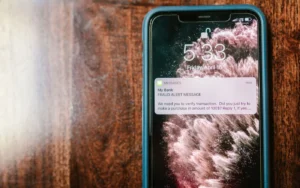
- Emails and texts that claim your account is locked, a payment failed, or someone tried to sign in.
- Direct messages from players promising rewards or warning about a “problem” with your account.
- QR codes sent by another person. PlayStation’s safety advice says never to scan one, even if the sender offers a reward.
- Free currency sites that promise PSN credit or in-game coins in exchange for your sign-in details.
- Typo domains that catch people who mistype a web address.
One wrong letter can land you on an unrelated site. Our guide to typo domains and lookalike addresses shows how small spelling slips send visitors to the wrong place.
Also note that psnuser.com is not where PlayStation accounts are managed. It currently shows a hosting provider’s default page, so never enter PSN details there.
Warning Signs to Check Before You Sign In
Most fake PSN login pages give themselves away if you slow down for a few seconds. Run these checks whenever a sign-in screen appears unexpectedly.
Read the Full Web Address
Look at the address bar, not the page design. Scammers can copy a design, but not the real domain.
To find the real site, look at the end of the address just before the first single slash. In a link like playstation.com.something-else.net/login, the real site is something-else.net, not PlayStation.
The U.S. Cybersecurity and Infrastructure Security Agency lists incorrect links and untrusted shortened URLs among the common signs of phishing.
Question How You Got There
Did the page open from a link in a message? That alone is a reason to stop. PlayStation warns players about requests to sign in using a link or to share account information to fix an issue.
If you think the message might be real, close it. Open a new browser tab, type playstation.com yourself, and check your account from there.
Notice Pressure and Strange Requests
Fake pages love urgency. A warning that your account will be banned within hours is designed to make you rush.
Also be wary of pages that ask for things a normal sign-in never needs, such as your full list of backup codes, your card number, or a code you did not request.
| Warning sign | What it can look like | Safe move |
|---|---|---|
| Lookalike address | Swapped letters, extra words, or the brand name in front of another domain | Close the tab and type playstation.com yourself |
| Link in a message | An email, text, or DM saying your account has a problem | Ignore the link and check your account directly |
| Shortened link | A short URL that hides where it really goes | Do not open it |
| Urgent threat | A countdown or a warning about a ban | Slow down and verify through the official site |
| Free reward | Free PSN credit or virtual currency for signing in | Skip it, because these sites collect account details |
| Extra requests | A list of backup codes, payment details, or a code you did not ask for | Stop and do not enter them |
A Safe Way to Sign In Every Time
The best protection is a simple habit. Follow these steps whenever you manage your account on the web.
- Open a new browser tab instead of clicking a link.
- Type playstation.com yourself, or use a bookmark you saved earlier.
- Go to account management from the official site.
- Let your password manager fill in your details. If it does not offer to, the site may not be the one you think.
Two extra layers help a lot. Turning on PSN 2-step verification means a stolen password alone is not enough to get in.
PlayStation also supports passkeys, which it describes as resistant to phishing. With a passkey, there is no password to type into a fake page. You can find more habits like these in our Online Safety guides.
What to Do If You Already Entered Your Password
Do not panic, but act quickly. These steps follow PlayStation’s own advice for accounts that may have been phished.
- Change your email password first, since email can be used to reset other accounts.
- Change your PSN password through the official site, or use PlayStation’s account recovery process if you are locked out.
- Sign out of PlayStation on all devices, and deactivate your consoles remotely if needed.
- Consider removing saved payment methods until you are sure the account is safe.
- Review your transaction history for purchases you did not make.
- Contact PlayStation Support as soon as possible if you cannot get back in.
Report the fake message too, using your email app’s report option.
Safety note: never share your password, verification codes, or backup codes with anyone, even someone who says they work for PlayStation.
PsnUser.com has more plain-English help on PSN accounts and website errors, and our blog covers new questions as they come up.
Frequently Asked Questions
Can fake PSN login pages look exactly like real ones?
Yes, scammers can copy the logo, colors, fonts, and layout of a real sign-in screen almost perfectly. What they cannot copy is the real web address. That is why checking the address bar, and typing playstation.com yourself, is far more reliable than judging how a page looks.
Does a padlock icon mean a login page is safe?
No, the padlock only shows that the connection between your browser and the site is encrypted. Scammers can set up encrypted connections on their own websites too. Treat the padlock as a basic requirement, not proof, and always confirm the domain before entering your sign-in ID or password.
Is it safe to sign in to PSN on an unofficial website?
No, only enter your PSN details on official PlayStation pages or in your console’s settings. For example, psnuser.com currently shows a hosting provider’s default page, not a PlayStation sign-in screen. If any unofficial site asks for your PSN password, close it without typing anything and open playstation.com yourself.
What should I do if I get a verification code I did not request?
An unexpected code can mean someone already knows your password and is trying to sign in. Do not share the code with anyone. Change your PSN password through the official site right away, make sure your email account is secure, and contact PlayStation Support if the messages keep arriving.